
Google Moves Brand AI Overviews to the Right Column
Google is showing AI Overviews for many brand searches in the right-hand column, where Knowledge Panels used to sit. Brands now have less control over a prominent summary of who they are.
Rajesh Kumar · 3 Nov 2026 · 3 min read
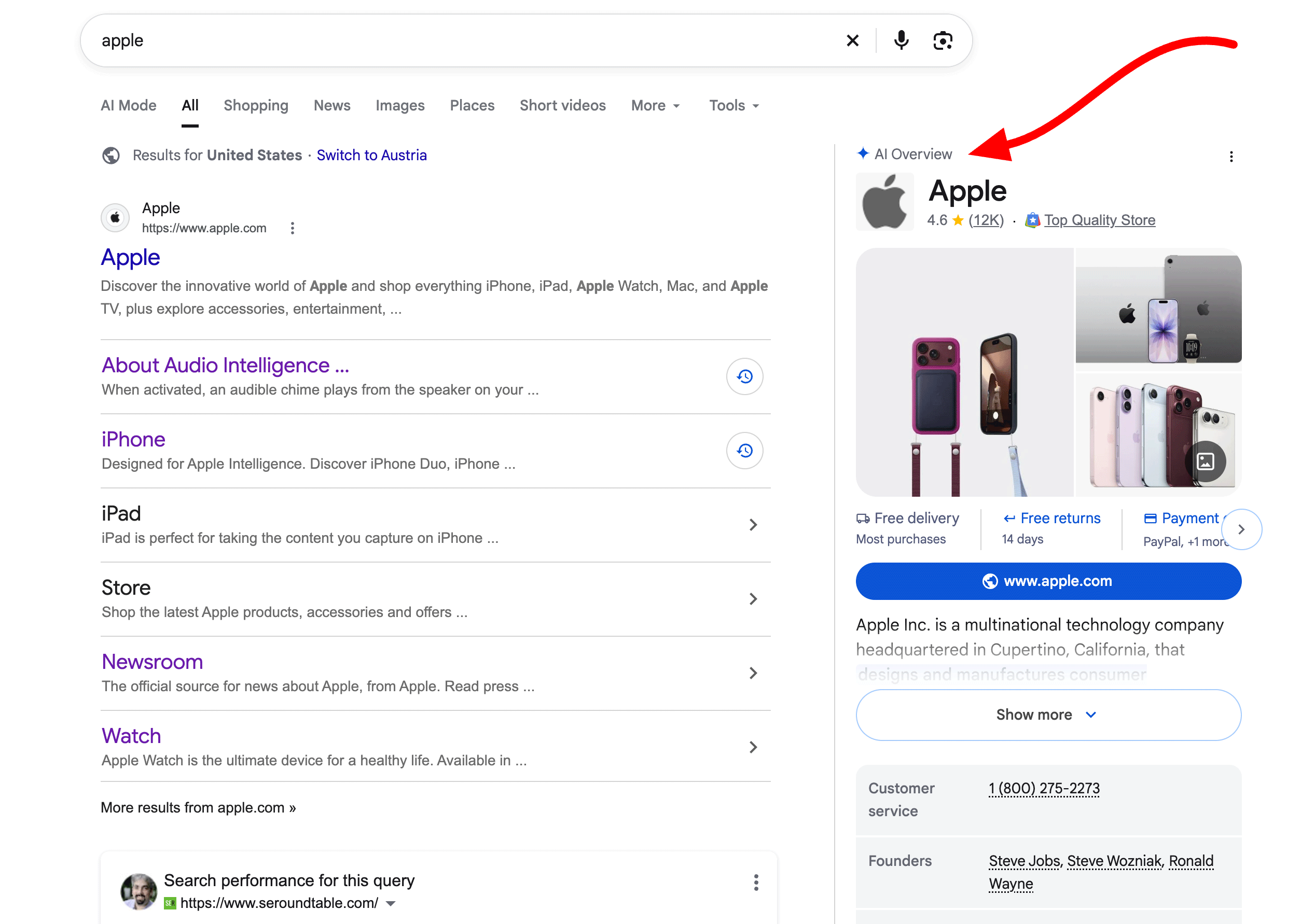
- Google is showing AI Overviews for many brand searches in the right-hand column, reportedly replacing Knowledge Panels in some cases.
- Earlier, these overviews appeared at the top or middle of the main results.
- The change was spotted by Chris Long and David McSweeney, and appears mainly on desktop with some variations.
- The source does not give data on traffic or click impact, so avoid assuming gains or losses.
- Brands should audit their AI summary, fix inconsistencies in public information and monitor branded queries in Search Console.
What happened
Google has started placing AI Overviews for many brand-related searches in the right-hand column of the results page. Before, they usually appeared at the top or in the middle of the main results.
According to Search Engine Roundtable, the change was spotted by Chris Long, who posted on X that Google is showing AI Overviews for brand terms in the right column instead of a Knowledge Panel. David McSweeney noticed something similar a couple of days earlier. He described it as mostly a desktop change, with the overview sometimes sitting further down the page. He also saw some other variations.
The example used was a search for [Apple]. The brand's AI Overview now appears in the space where a brand panel would normally be.
This looks like a layout test or rollout rather than a fully documented change. McSweeney himself said "assuming it is a change," so treat the details with some caution.
Why it matters
The Knowledge Panel has long been Google's quick summary of a brand: who you are, what you do, and where to find you. If an AI-generated overview is replacing it for brand searches, the summary is now written by a model rather than assembled mainly from structured entity data.
That raises a few practical issues.
Brand narrative control. The source article raises a fair concern: trusting AI to describe your brand as well as your own website does is a big ask. If the summary is vague, outdated or wrong, it sits in a prominent spot next to your listing.
Cleaner main results. Moving the overview to the side may be better for users, and both people quoted in the source seem to think so. The main column stays focused on links, so your organic listings may not be pushed down as much by a large AI block for branded queries.
Branded search is still the most valuable traffic. People who type your name are often close to buying, contacting you or logging in. Whatever Google shows beside your listing shapes that final step.
What this does not tell us
The source does not say how many brands are affected, whether the change is permanent, or how it affects clicks. Nothing in it shows a traffic gain or loss. Anyone claiming to know the impact today is guessing.
What to do now
1. Search your own brand name. Check desktop and mobile, and try variations such as brand plus product, brand plus reviews and brand plus pricing. Screenshot what you see so you can track changes.
2. Read the AI summary like a customer. Is the description accurate? Does it get your products, locations, pricing model or founding details right? Note any errors.
3. Tighten your own source material. Make sure your About page, product pages and contact details say clearly what you do. Keep names, addresses and descriptions consistent across your website, social profiles and business listings. AI systems draw on what is publicly available, so contradictions can become mistakes in the summary.
4. Keep structured data and entity signals in order. Organization markup, consistent profiles and a well-maintained Google Business Profile, where relevant, remain sensible basics.
5. Watch branded click-through in Search Console. Compare branded queries before and after the layout change. Look at impressions, clicks and CTR separately, and be careful about drawing conclusions from small shifts.
6. Check the same question in other AI tools. Ask ChatGPT, Gemini and Perplexity to describe your brand. If they all repeat the same error, the problem probably sits in your public footprint, not just in Google.
The bigger picture
Brand searches used to be the safest corner of Google, where your own site and a controlled panel dominated. AI-written summaries now reach into that territory. The brands that cope best will be those with clear, consistent information published everywhere a model might look.
Raj's takeThis is a sensible layout move for users, but it hands a key piece of brand storytelling to a model. I would not panic, but I would check my brand searches this week and fix any messy or contradictory information on my site and profiles. Branded search is where buyers are closest to a decision, so accuracy there matters more than almost any other keyword.
Want this applied to your business?
Related

Google's Privacy Update Opens Gmail and Photos to Ad Targeting
Google has changed its privacy policy so that data from Gmail, Drive and Photos can inform personalized ads if you connect them to AI features like Personal Intelligence. Here is what marketers and business owners should understand and do.
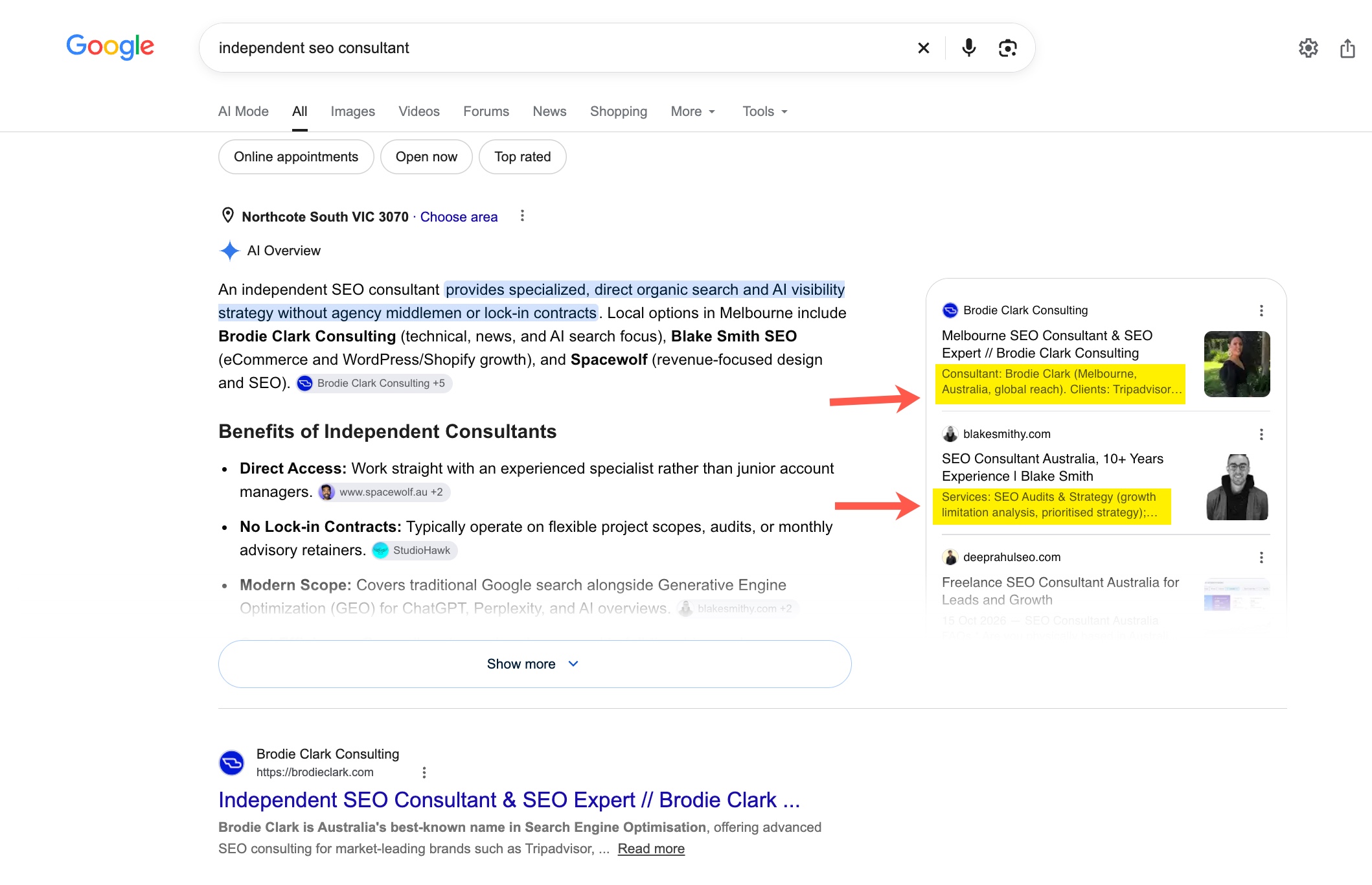
Google AI Overviews Now Summarise Your Page in Citation Cards
Google appears to be testing AI-generated summary snippets inside the citation cards of AI Overviews. The text shown may not match your page, which changes how your content is represented in search.
Google AI Overviews Now Summarise Your Page in Citation Cards
Google appears to be testing AI-generated summary snippets inside AI Overview citation cards. The text shown may not match your page, which changes how brands think about being cited.