
Google AI Overviews Now Summarise Your Page in Citation Cards
Google appears to be testing AI-generated summary snippets inside the citation cards of AI Overviews. The text shown may not match your page, which changes how your content is represented in search.
Rajesh Kumar · 26 Oct 2026 · 3 min read
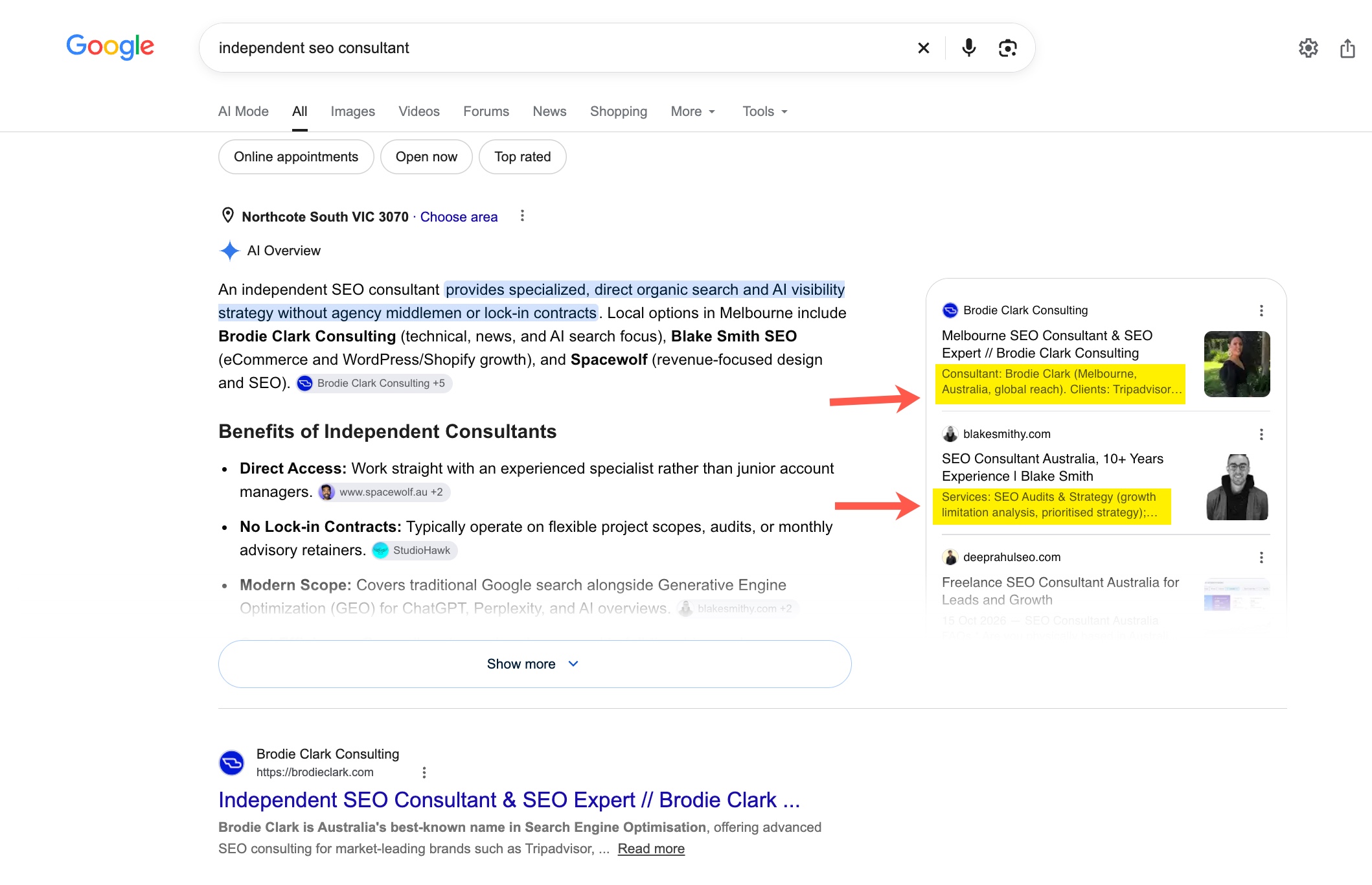
- Google appears to be testing AI-written summary snippets in AI Overview citation cards, and not every query shows them.
- The summary text may not appear verbatim on your page; it is shaped by what Google thinks is relevant to the query.
- Businesses have less control over how their pages are described before a user clicks.
- Clear, extractable page content and accurate key facts reduce the risk of misleading summaries.
- Monitor your own queries and Search Console data before changing strategy, as this is still a test.
What happened
Google seems to be testing, or slowly rolling out, AI-generated summaries inside the citation cards that sit beside (or below) AI Overviews in Google Search. These are the cards that link out to the sources behind an AI answer. They can now show a short description written by AI.
Brodie Clark spotted it and shared it on X. His observation was that the text does not appear word for word on the page. Google is summarising the content based on what it considers most relevant to the query.
According to Search Engine Roundtable, Barry Schwartz sees the same thing on some of his test queries, but not all of them. That points to a test or a partial rollout, not a finished feature.
Why this matters
For years, the snippet under a blue link was at least partly under your control. You wrote a meta description, you structured your page, and Google often pulled a sentence from your content. Even when Google rewrote it, the text was usually traceable to your page.
Citation cards with AI summaries add another layer. Google is now describing your page in its own words, shaped by the user's query. Two people searching slightly different questions could see two different descriptions of the same URL.
That has a few implications:
- Less control over your message. Your carefully written positioning may not be what the user reads before deciding to click.
- Query-specific framing. The summary leans toward what Google thinks is relevant, which may emphasise details you consider secondary.
- Possible mismatch risk. If the summary is slightly off, the click may bring disappointed visitors, or no click at all.
We should be careful not to over-read this. The source does not say how widely it is live, whether it affects click-through rates, or how Google chooses the content it summarises. Those are open questions.
What this means for ecommerce and local businesses
If you sell products, the details Google considers relevant could be price, availability, materials, sizing, shipping or return terms. If those facts are buried in images, tabs or JavaScript-heavy elements, a summary may miss them or get them wrong.
Service businesses face a similar issue. If your page leads with vague marketing language and hides what you actually do, who you serve and where, an AI summary has little solid material to work with.
Practical actions
1. Make key facts easy to extract. Put the core answer near the top of the page in plain text. Use clear headings that match how customers phrase questions.
2. Write for query-level relevance. Pages that cover a topic in distinct, well-labelled sections give Google more accurate material to summarise for different queries.
3. Check your own pages in AI Overviews. Run your main commercial and informational queries and see whether your site appears in citation cards. Note how the description reads compared with your actual page. Screenshots with dates are useful, since this seems to vary by query.
4. Keep meta descriptions honest and useful. They may not be shown, but they remain a clear statement of what the page is about, and good copy discipline helps everywhere.
5. Watch your click data. In Search Console, look at queries where you believe AI Overviews appear, and compare impressions and clicks over time. Don't draw conclusions from a few days of data on a test feature.
6. Avoid chasing the summary. Don't rewrite pages just to game an AI description. Fix clarity, accuracy and structure, which helps users, classic search and other AI tools such as ChatGPT and Perplexity.
The bigger picture
Search results are gradually shifting from showing your words to showing Google's interpretation of your words. Being cited is still valuable, but the way you are presented is increasingly out of your hands.
The best response is not panic. It is to make your pages unambiguous, factual and easy to parse, so that when an AI summarises you, it has little room to get it wrong.
Raj's takeThis is another step toward Google describing your business in its own voice, and I would not fight it with tricks. I'd make sure the price, offer, location and proof points sit in plain, well-structured text so the summary has accurate material. Test your top ten queries now and keep dated screenshots, because we don't yet know what this does to clicks.
Want this applied to your business?
Related
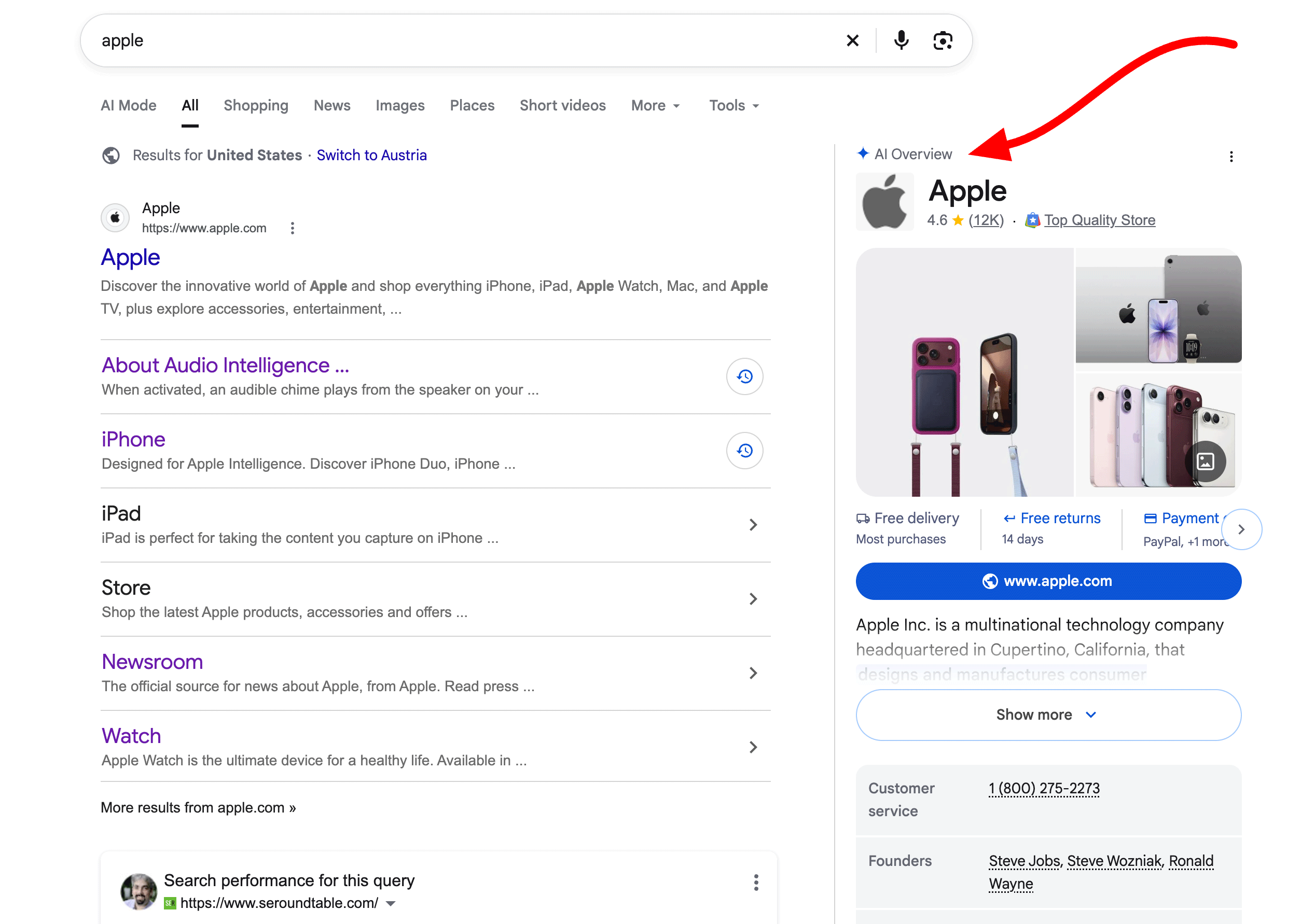
Google Moves Brand AI Overviews to the Right Column
Google is showing AI Overviews for many brand searches in the right-hand column, where Knowledge Panels used to sit. Brands now have less control over a prominent summary of who they are.

Google's Privacy Update Opens Gmail and Photos to Ad Targeting
Google has changed its privacy policy so that data from Gmail, Drive and Photos can inform personalized ads if you connect them to AI features like Personal Intelligence. Here is what marketers and business owners should understand and do.
Google AI Overviews Now Summarise Your Page in Citation Cards
Google appears to be testing AI-generated summary snippets inside AI Overview citation cards. The text shown may not match your page, which changes how brands think about being cited.