
Google Universal Cart Is Live: What Ecommerce Sellers Should Do
Google's Universal Cart has started appearing in Search and Gemini for US users, with add-to-cart buttons right in product listings. Here is what it changes for ecommerce visibility and what to prepare before the holiday season.
Rajesh Kumar · 26 Oct 2026 · 3 min read
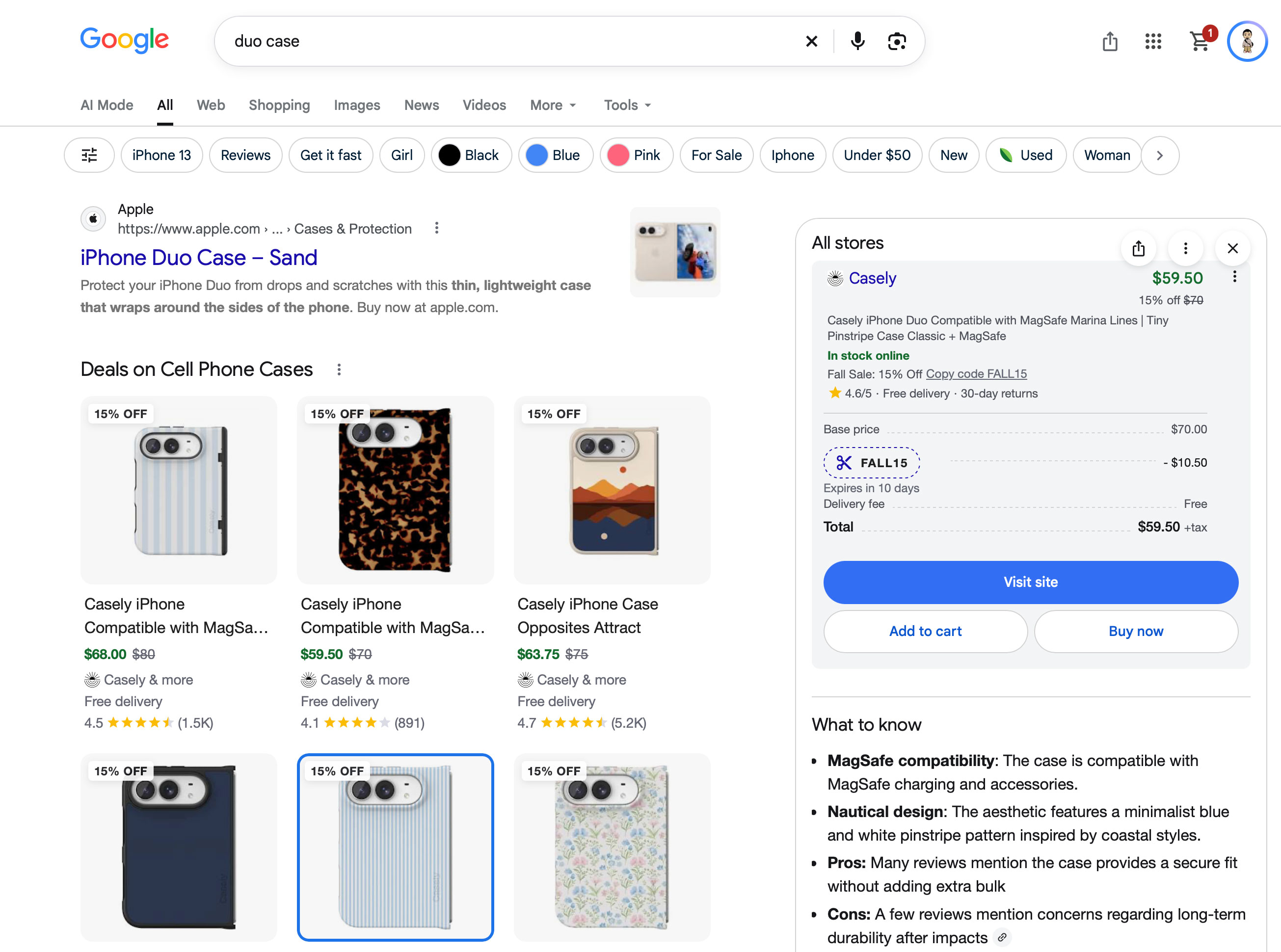
- Google's Universal Cart is rolling out in the US across Search and Gemini, with a cart icon at the top right and Add to cart buttons on product listings.
- Shoppers choose options like size, then confirm; the cart uses Google Pay, shows card-based reward points and has a My orders tab.
- Product feed quality and accurate variants matter more when selection happens inside Google.
- Merchant-side details such as reporting and attribution are not covered yet, so monitor Google's documentation.
- Record baseline Google Shopping performance now to measure any holiday-season change.
What happened
Google's Universal Cart, first demoed at Google I/O in May, is now rolling out in the United States. According to Search Engine Roundtable, most people began seeing it in Google Search and Gemini from Friday through the weekend, a few days after Google announced the launch.
The visible changes are simple. A shopping cart icon sits at the top right of the search results page, near the account profile. Product listings now carry "Add to cart" buttons, and items go into one cart that works across Google Shopping and other Google surfaces.
SEO Glenn Gabe tested it and described the flow. He searched for products and clicked "Add to cart". Then he picked options such as size and clicked "Add to cart" a second time to confirm. The cart uses Google Pay, so his payment details were already there, and it showed reward points he could earn based on his credit card. The cart also has a separate "My orders" tab.
The report says US users should have access before the holiday season.
Why it matters
This moves Google from a place where people discover products to a place where they collect them. Before, a shopper clicked through to a store to decide and buy. Now they can park several products from several merchants in one cart without leaving Google.
That has a few implications for ecommerce owners:
- Comparison happens earlier. If shoppers build a cart inside Google, the decision between your product and a competitor's may be made before anyone reaches your site.
- Your product data does more work. Variants, sizes and options are selected inside Google's interface. Messy or incomplete data will cost you at the moment of intent.
- Trust is the open question. Gabe said the feature has a lot of potential but he wants to see how many people use and trust it. Habit change in shopping is slow, and that applies here too.
- Gemini is part of this. The cart appears in Gemini as well as Search, which ties AI-driven product discovery to a purchase action.
What we do not know yet
The source does not cover merchant-side details. It does not say how orders are reported to sellers, how attribution will look in analytics, or what it means for fees, customer data or checkout ownership. Do not assume answers. Watch Google's merchant documentation and your own account for updates.
Practical actions for sellers
1. Audit your product feed. Check titles, prices, availability, images and variant attributes in Google Merchant Center. If a shopper must choose a size or colour inside Google, your options need to be accurate and complete.
2. Keep price and stock in sync. A cart is a commitment signal. Mismatches between the feed and your site create refunds, complaints and possible policy trouble.
3. Test it yourself. Search for your own products and your competitors' in the US. Add them to a cart. See how your listings look next to others, and note what a shopper sees at each step.
4. Set a baseline now. Record your current Shopping traffic, conversion rate and revenue from Google channels. If sales patterns change in the fourth quarter, you will want a clean before-and-after comparison.
5. Strengthen the reasons to choose you. If the cart reduces friction for everyone, price and convenience become easier to compare. Review reviews, shipping terms, return policies and brand strength. These are what make a shopper keep your item in the cart.
6. Plan for the holidays. With a US launch ahead of peak season, expect shopper behaviour to shift in ways you cannot fully predict. Keep budgets and inventory flexible.
The bigger picture
Google is steadily shortening the path between a search and a purchase. For merchants outside the US, nothing changes yet, but this kind of feature rarely stays in one market forever. Stores that already run clean feeds and strong product pages will be better placed whenever it expands.
The lesson is not to panic. Treat your product data as a core sales asset, because Google now acts more like a storefront that displays it.
Raj's takeGoogle wants to own more of the shopping journey, and this cart is a clear step in that direction. I would not rewrite my strategy yet, but I would fix feeds, check variants and set a baseline before the holiday rush. The sellers who treat product data as a sales asset will benefit first.
Want this applied to your business?
Related

Alexa for Shopping Hits 400M Users: What Sellers Must Do Now
Amazon says over 400 million customers used Alexa for Shopping in the past 12 months, and those users spend 50% more. For brands, the AI shopping assistant is becoming a new storefront layer inside a walled garden.

AI Shopping Visibility: Fix Your Product Data First
A Search Engine Journal webinar recap shows AI shopping tools need product data that bots can retrieve, shoppers' language, and feeds that match pages. Here is what ecommerce teams can do now.

Three AI Models, Same 20 Products, Three Different Winners
A test of three Claude models shopping Shopify's catalog found they never agreed on a top pick. For merchants, which store wins an AI-driven order may depend on the model the shopper's agent runs on.